Search Engine Optimization (SEO)
Please note: This document is designed to help optimize your Cascade website. Also, please keep in mind that the changes you make to your site won’t immediately be reflected on Google; in fact, it might take up to a week for them to pick up on your changes.
There are two key methods to help ensure your site ranks in Google searches:Meta Information and HTML Code
It is a good practice when building your website in Cascade to edit the meta information. To do this, fill in the following metadata under the edit tab for each page of your website as referenced by Hannon Hill.
Display Name - This will be displayed in the side navigations and in the breadcrumbs and is different than the system name (i.e. News & Publications, Alumni Publications)
Summary - A short synopsis of the page
Teaser - A short and punchy sentence/phrase about the page
Keywords - Keywords should reflect the main content on your website. Keep your keywords as “solid” as possible by thinking about what users might use to find your website. They should be separated with commas or else they will be treated as one term “keyphrases” (i.e.: “earth studies” versus “earth, studies”).
- Acceptable keywords: heath sciences, western, undergraduate, graduate, nursing, kinesiology
The World Wide Web Consortium (WC3) recommends commas in HTML 4.01 specification:
Some indexing engines look for META elements that define a comma‐separated list of keywords/phrases, or that give a short description. Search engines may present these keywords as the result of a search. The value of the name attribute sought by a search engine is not defined by this specification.
Consider the example: <META name="keywords" content="vacation,Greece,sunshine"
Description - Displayed below website titles in search engines and are useful when searching for a website. Try to limit your description to one professional‐sounding sentence of no more than 20 words (at most
- Acceptable: The Faculty of Health Sciences at The University of Western Ontario
- Unacceptable: FHS at UWO. Welcome to our website!
Author - Make the author of the site your department name (i.e. Department of Chemistry). Do not use any one person’s name.
--
HTML ‐ TITLE
Edit your code and give your page a good title (you’ll find the text you’ll need to change between the <title> and </title> tags). Make sure you create a meaningful page title that reflects your faculty and some keywords about your content. For example:
- Acceptable: Western News – Stories, or The University of Western Ontario
- Unacceptable: Welcome!, or Homepage
HTML – H1, etc.
One of the most important things you can do is use HTML tags in the way they were intended. Google seems to like content and titles within heading tags (<h1>, <h2>, etc.).
Your page titles should be within H1 tags and be as on topic as possible. Titles like, “Welcome to our website!” do nothing (think about how many other sites are on the Internet saying the same thing).
Titles like “The Biology Graduate Advantage at Western” might be more on topic and relevant to an actual search a user might carry out.
(top)Titles like The Biology Graduate Advantage at Western might be more on topic and relevant to an actual search a user might carry out.
(top)Adding metatag description
What is a metatag description?
A meta description is the snippet of information below the link of a search result. Its purpose is to describe the contents of the page to the searcher. Meta descriptions are important marketing messages and the end goal is to convince and persuade the searcher to click through to your website. Any words that match the search term are bolded in the description.
Here is an example of a Google search using keywords media relations western university. The snippet framed in red is a metatag description. 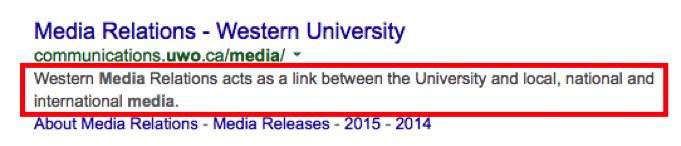
Although they not important to search engine rankings, metatag descriptions play a very important role in improving click-through rates from the search engine results pages to your website.
Here is a good example of a metatag description for a Western website:

How to write a metatag description?
- Keep it under 155-160 characters.
Search engines will truncate (cut off) anything longer than 160 characters. Make sure your description is short. Use this handy SEOMOFO tool to create the description for the search engine results pages. Your meta description has got to grab the user's attention and to ensure they click on your website. - Be concise.
Think about how you read the search engine results pages. Your meta description has got to grab the user's attention and to ensure they click on your website. - Write compelling marketing copy.
Are you selling products or services, or is your page purely informational? What can the user expect to get from your page by clicking on it? Explain clearly why people should visit your website. Use your meta description as a marketing message and ensure it communicates the value the user will get from coming to you. - Incorporate keywords, if possible.
If a person's search query closely matches your meta description, Google will highlight the search term in the description. This makes your listing more enticing to the user by pointing out the relevance to the search query. So think about the keywords you are targeting for, what search terms do you hope your page will appear? Use those terms in your description.
How to add a metatag description to Cascade?
- Login to Cascade.
- Locate index page.
- In the Edit mode, click on Metadata.
- Paste the metatag description in the Description field.
- Submit the change.
- Publish the page.
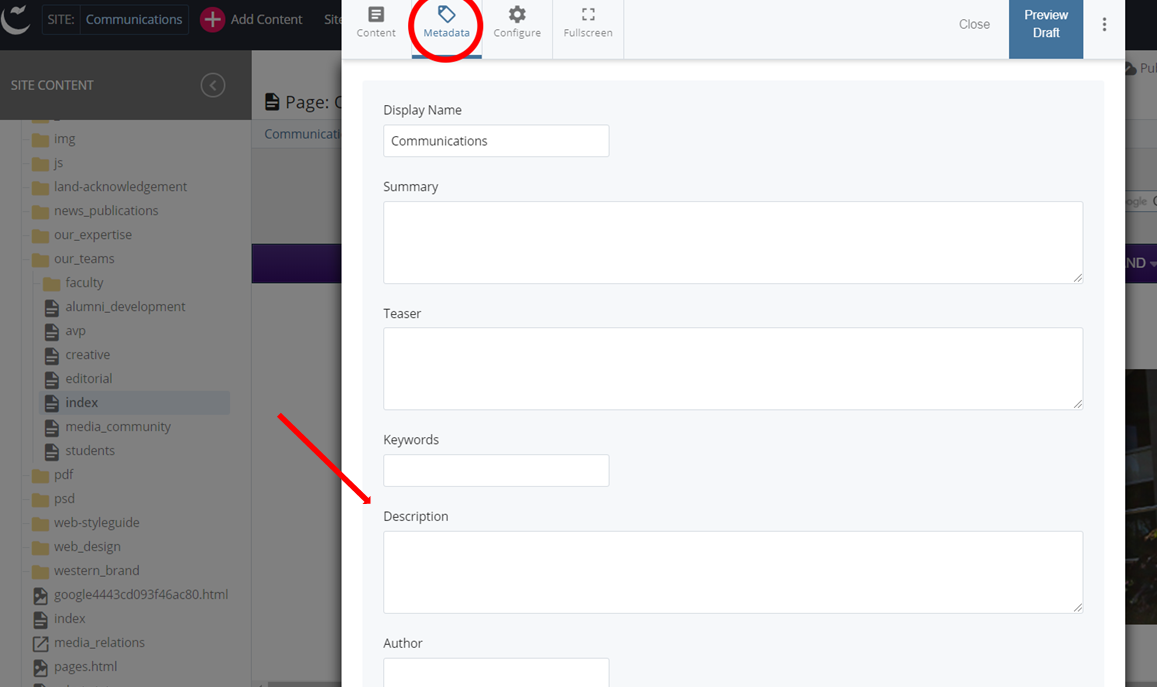
Although it is recommended to differentiate metatag description for different pages of a website, you can start by adding it to the index page. If there are other sub-sections of the website that are significant for your audience, create and add metatag descriptions to these pages as well.
Send an email to web@uwo.ca if you have any questions / comments.
Meaningful Content
One of the most important parts of ensuring that you place well in a search engine like Google is writing good, relevant copy.
Content related to keywords
The general rule when writing copy is to write in as many keyword‐friendly terms as you can without spamming (repeating the same keywords many times with no real information being provided). While being keyword‐rich, it’s also important to be concise and on‐topic. A viable paragraph might look like this:
- Western's Department of Earth Sciences has a proud tradition of outstanding scholarship and research that continues to grow with innovative research. Our willingness to explore new approaches to problems has resulted in the department being awarded a Canada Research Chair and an NSERC Industrial Research Chair. Take the opportunity to engage your intellectual curiosity and creativity by participating in Western's cutting edge research.
In the end, regardless of your code and content, the most important thing you can do is have relevant, informative, and useful content and tools.
Best Practices for Content
- Be error free and grammatically correct. No one wants to read sloppy text.
- Don’t put text inside images just to preserve the headline font. Not only can search engines not read it, but users can’t resize or copy and paste it if they want/need to.
- Stay organized: keep your content on‐topic. Keeping your content current will make it more likely that people will revisit you frequently to tap into your expertise.
- Use relevant language that users might search for to find your content. For example, people might search for popular acronyms or specific pieces of content. To make sure you’re on topic with relevant searches, you can use Google’s keyword tool (Hhttps://adwords.google.com/select/KeywordToolExternalH). Just enter a keyword you’re thinking of using and see what similar terms people are using to find content similar to yours.
- Don’t let your content get stagnant. Update your content as often as possible to keep users coming back for more. A good schedule is to have something update on your landing page at least 5x/week (that works out to once a day if possible).





